Examples
Config Example
Here is an example config with some real use cases.
Config Example with Use Cases
yaml
# ===========================================
# CONFIG EXAMPLE
# ===========================================
#
# Real-world use cases for LoggiFly v2.
#
# Feel free to contribute your use cases:
# https://github.com/clemcer/loggifly/blob/main/docs/configs/config_example.yaml
global:
defaults:
trigger_cooldown: 0
container_action_cooldown: 60
hide_full_regex: true
# keywords applied to every matched target
keywords:
- keyword: panic
attach_logfile: true
- fatal
containers:
rules:
- container_name: audiobookshelf
ntfy_topic: abs
ntfy_tags: "books,headphones"
ntfy_icon: "https://cdn.jsdelivr.net/gh/selfhst/icons@main/png/audiobookshelf.png"
trigger_cooldown: 5
title_template: "{{ container_name }}"
keywords:
# user requested download
- regex: '(?P<timestamp>\d{4}-\d{2}-\d{2} \d{2}:\d{2}:\d{2}.\d{3}).*User "(?P<user>[a-zA-Z0-9._+-]+)" requested download for item "(?P<item>[A-Za-z\s]+)"'
message_template: |
🔎 The user {{ user }} requested download for '{{ item }}'!
🕐 {{ timestamp }}
# user was online
- regex: '(?P<timestamp>\d{4}-\d{2}-\d{2} \d{2}:\d{2}:\d{2}.\d{3}).*Socket.*disconnected from client "(?P<user>[a-zA-Z0-9._+-]+)"'
message_template: |
🔎 The user '{{ user }}' was seen!
🕐 {{ timestamp }}
# failed login attempt
- regex: '(?P<timestamp>\d{4}-\d{2}-\d{2} \d{2}:\d{2}:\d{2}.\d{3}).*Failed login attempt for username "(?P<user>[a-zA-Z0-9._+-]+)" from ip (?P<ip_address>\d{1,3}(?:\.\d{1,3}){3})\s+\((?P<error>[A-Za-z\s]+)\)'
message_template: |
🚨 Failed login!
🙎♂️ Username: '{{ user }}'
🔎 IP Address: {{ ip_address }}
🕐 {{ timestamp }}
- podcast
- regex: User.*logged in
- failed login
- Error in openid callback
- container_name: vaultwarden
ntfy_tags: "closed_lock_with_key"
ntfy_priority: 5
ntfy_topic: security
ntfy_icon: "https://cdn.jsdelivr.net/gh/selfhst/icons@main/png/vaultwarden.png"
trigger_cooldown: 0
keywords:
- regex: '(?P<timestamp>\d{4}-\d{2}-\d{2} \d{2}:\d{2}:\d{2}\.\d{3}).*Username or password is incorrect. Try again. IP: (?P<ip_address>\d{1,3}(?:\.\d{1,3}){3}). Username: (?P<email>[a-zA-Z0-9._%+-]+@[a-zA-Z0-9.-]+\.[a-zA-Z]{2,})'
message_template: |
🚨 Failed login!
📧 Email: '{{ email }}'
🔎 IP Address: {{ ip_address }}
🕐 {{ timestamp }}
title_template: "Failed Vaultwarden login"
ntfy_tags: "rotating_light"
- container_name: paperless-webserver
ntfy_priority: 5
ntfy_topic: security
trigger_cooldown: 0
ntfy_icon: "https://cdn.jsdelivr.net/gh/selfhst/icons@main/png/paperless-ngx.png"
keywords:
- regex: '.*(?P<timestamp>\d{4}-\d{2}-\d{2} \d{2}:\d{2}:\d{2},\d+).*Login failed for user `(?P<username>.*)` from IP `(?P<ip>.*)`'
message_template: |
🚨 Failed login!
📧 Username: '{{ username }}'
🔎 IP Address: {{ ip }}
🕐 {{ timestamp }}
title_template: "Failed Paperless-ngx login"
ntfy_tags: "closed_lock_with_key,rotating_light"
- container_name: homeassistant
ntfy_priority: 5
ntfy_topic: security
trigger_cooldown: 0
ntfy_icon: "https://cdn.jsdelivr.net/gh/selfhst/icons@main/png/home-assistant.png"
keywords:
- regex: '(?P<timestamp>\d{4}-\d{2}-\d{2} \d{2}:\d{2}:\d{2}).*Login attempt or request with invalid authentication from (?P<ip>.*)\. Requested URL.*'
message_template: |
🚨 Failed login!
🔎 IP Address: {{ ip }}
🕐 {{ timestamp }}
title_template: "Failed Home Assistant login"
ntfy_tags: "closed_lock_with_key,rotating_light"
- container_name: immich_server
ntfy_tags: "camera_flash"
ntfy_priority: 5
ntfy_topic: security
ntfy_icon: "https://cdn.jsdelivr.net/gh/selfhst/icons@main/png/immich.png"
trigger_cooldown: 0
keywords:
- regex: '.*(?P<timestamp>\d{2}\/\d{2}\/\d{4}, \d+:\d{2}:\d{2} (?:AM|PM)).*Failed login attempt for user (?P<username>.*) from ip address (?P<ip>.*)'
message_template: |
🚨 Failed login!
📧 Username: '{{ username }}'
🔎 IP Address: {{ ip }}
🕐 {{ timestamp }}
title_template: "Failed Immich login"
ntfy_tags: "camera_flash,rotating_light"
- container_name: immich_machine_learning
ntfy_tags: "camera_flash,robot"
ntfy_topic: server
ntfy_icon: "https://cdn.jsdelivr.net/gh/selfhst/icons@main/png/immich.png"
ntfy_markdown: true
container_events:
- event: oom
attach_logfile: true
ntfy_tags: "robot,rotating_light"
- event: crash
ntfy_tags: "robot,rotating_light"
container_action: restart
container_action_cooldown: 10
title_template: "Immich Machine Learning crashed (exit code: {{ exit_code }})"
# link inside message_template is formatted as markdown because of ntfy_markdown: true
message_template: |
🔁 {{ action_result_message }}
🔎 [Link to Dozzle](http://192.168.178.222:8080/container/{{ container_id }})
- container_name: grafana
ntfy_tags: "closed_lock_with_key"
ntfy_priority: 5
ntfy_topic: security
ntfy_icon: "https://cdn.jsdelivr.net/gh/selfhst/icons@main/png/grafana.png"
trigger_cooldown: 0
keywords:
- regex: '.*logger=authn\.service.*\[identity.not-found\]\s+(?P<msg>.*)'
message_template: "🚨 {{ msg }}"
title_template: "Failed Grafana login"
- regex: '.*logger=authn\.service.*\[password-auth.failed\]\s+(?P<msg>.*)'
message_template: "🚨 {{ msg }}"
title_template: "Failed Grafana login"
- container_name: ebook2audiobook
attachment_lines: 300
keywords:
- 100%
- sentence
- converting
- keyword: total audio parts saved to
attach_logfile: true
# Authelia has JSON logs. JSON keys are available as template fields
- container_name: authelia
ntfy_topic: security
ntfy_icon: "https://cdn.jsdelivr.net/gh/selfhst/icons@main/png/authelia.png"
keywords:
- regex: \bsuccessful.*authentication
title_template: "Successful Authelia login"
message_template: |
🔎 IP: {{ remote_ip }}
🕐 {{ time }}
{{ msg }}
- keyword: user not found
title_template: "Failed Authelia login"
message_template: |
🚨 Somebody tried to log in with a username that does not exist
🕐 {{ time }}
{{ msg }}
- container_name: adguard
attach_logfile: true
attachment_lines: 100
ntfy_topic: adguard
ntfy_icon: "https://cdn.jsdelivr.net/gh/selfhst/icons@main/png/adguard-home-light.png"
keywords:
- failed
- error
# fluentbit streaming kernel messages (JSON format)
# Assumes fluentbit configured with:
# -i kmsg -t kernel -o stdout -p match=* -p format=json_lines
- container_name: fluentbit-kernel
ntfy_tags: "warning"
ntfy_priority: 3
ntfy_topic: server
trigger_cooldown: 0
keywords:
- all_of:
- '"priority":4'
message_template: "{{ msg }}"
title_template: "Kernel warning"
ntfy_priority: 3
ntfy_tags: "warning"
- all_of:
- '"priority":3'
message_template: "{{ msg }}"
title_template: "Kernel error"
ntfy_priority: 4
ntfy_tags: "exclamation"
- all_of:
- '"priority":2'
message_template: "{{ msg }}"
title_template: "Kernel critical error"
ntfy_priority: 5
ntfy_tags: "skull"
- all_of:
- '"priority":1'
message_template: "{{ msg }}"
title_template: "Kernel alert"
ntfy_priority: 5
ntfy_tags: "skull"
notifications:
ntfy:
url: "http://your-ntfy-server"
topic: loggifly
token: ntfy-token
username: john
password: password
priority: 3
tags: "kite,mag"
apprise:
url: "discord://webhook-url"
webhook:
url: "https://custom.endpoint.com/post"
headers:
Authorization: "Bearer token"
X-Custom-Header: "Test123"
settings:
system_notifications:
config_reload: true
monitor_event: false
start: false
shutdown: false
multi_line_entries: trueINFO
Feel free to contribute your use cases to the file.
Systemd Monitoring
You can monitor systemd services / journal logs with LoggiFly by setting up a fluentbit container.
With this compose file journal logs are directly streamed to the fluentbit container logs where LoggiFly can then monitor them.
Fluentbit Compose File
yaml
services:
  fluentbit:
    image: fluent/fluent-bit:latest
    container_name: fluentbit
    read_only: true
    volumes:
      - /var/log/journal:/var/log/journal:ro
    command: >
      /fluent-bit/bin/fluent-bit
      -i systemd -p tag=journal -p path=/var/log/journal -p read_from_tail=true
      -o stdout -p match=* -p format=json_lines
    restart: unless-stopped
LoggiFly Config Example
yaml
containers:
  rules:
    - container_name: fluentbit
      keywords:
        - all_of:
            - keyword: ssh
            - keyword: failed
            - keyword: password
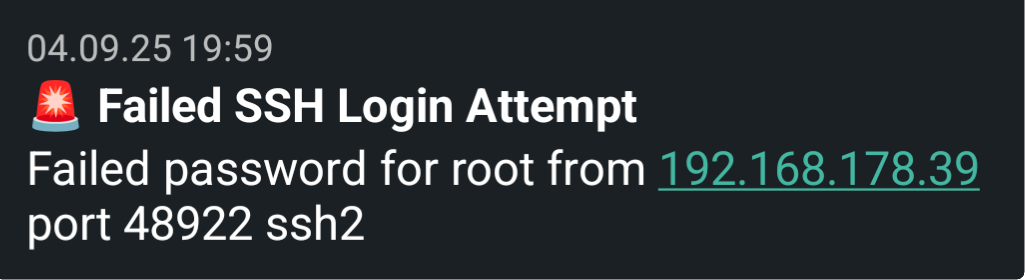
          title_template: 'Failed SSH Login Attempt'
          message_template: '{{ MESSAGE }}' # this is a field available in the JSON log entry
          trigger_cooldown: 0
          ntfy_tag: rotating_light
Result