Template Fields Reference
You can customize the message and title of your notifications using message_template and title_template.
Templates use Jinja2 syntax. Variables are wrapped in double curly braces: {{ container_name }}. Beyond simple variable substitution, Jinja2 gives you conditionals, filters, and default values (covered below).
You can use default template fields or extract additional information from logs using JSON or regex.
Both settings can be defined at the defaults, source or keyword level.
defaults:
  title_template: "{{ keywords }} found in {{ container_name }}"
  message_template: |
    Time: {{ datetime }}
    Log: {{ log_entry }}

containers:
  rules:
    - container_name: container1
      title_template: "{{ container_name }}: {{ keywords }}"
      message_template: "{{ log_entry }}"
      keywords:
        - keyword: "error"
          title_template: "Error found in container1 at {{ datetime }}"
          message_template: |
            Found keywords: {{ keywords }}
            Time: {{ datetime }}
            Log: {{ log_entry }}
Here are some example notifications using templates: 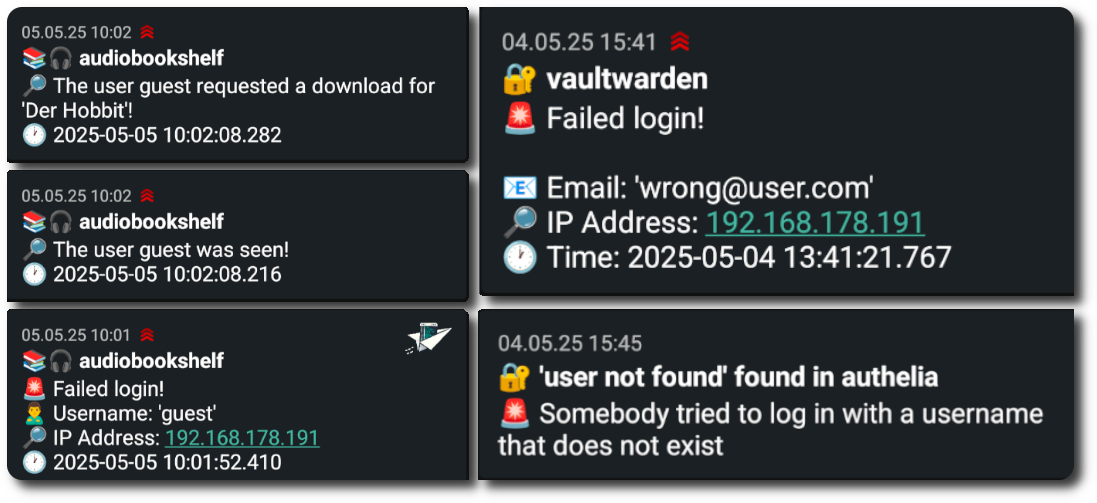
WARNING
Using templates can lead to you not getting all information that would otherwise be included in the notifications by default.
Two examples are the host_identifier (for swarm or multi-host setups) and the action_result_message of container actions.
This info is included in the notification title by default, but if you use a title_template it is up to you to include it. You can use {% if %} to only show these fields when they are actually present, see below.
Always Available Template Fields
The following template fields are always available for both message_template and title_template, although they might be empty if no information is available.
Default Template Fields
| Field | Description |
|---|---|
{{ notification_type }} | Type of notification (either log_match or docker_event) |
{{ monitor_type }} | Either container or swarm depending on whether the monitored target is a regular container or a swarm service |
Log Match Information
| Field | Description |
|---|---|
{{ keywords }} | Matched keywords (formatted list) |
{{ keyword }} | Alias for keywords |
{{ log_entry }} | Full log entry |
Threshold Triggering Information
Only present when trigger_on is configured on the matched keyword.
| Field | Description |
|---|---|
{{ trigger_on_count }} | The configured match count threshold |
{{ trigger_on_timeframe }} | The configured timeframe in seconds |
Buffer information
Only present when trigger was buffered.
| Field | Description |
|---|---|
{{ buffer_elapsed_seconds }} | The time in seconds that the trigger was buffered |
{{ buffer_match_count }} | How often the trigger matched in the specified number of seconds |
{{ buffer_line_count }} | How many lines were collected. Only differs from buffer_match_count when mode is all |
Container Action Information
Only present when a container action is triggered.
| Field | Description |
|---|---|
{{ container_action_result_message }} | Result message of the triggered container action |
{{ container_action_succeeded }} | True if the container action succeeded, False otherwise |
{{ container_action_type }} | Type of the triggered action (e.g. restart or stop) |
{{ container_action_target }} | Target container of the action |
{{ container_action_string }} | Full configured action string (e.g. restart@container_name) |
Container Information
| Field | Description |
|---|---|
{{ container_id }} | Container ID (12 characters) |
{{ full_container_id }} | Full container ID (64 characters) |
{{ container_name }} | Container name |
{{ docker_image }} | Container image name |
{{ target_name }} | container_name for regular containers, or service name with replica number for swarm containers |
{{ service_name }} | Swarm service name (if applicable) |
{{ stack_name }} | Docker stack name (if applicable) |
Docker Container Event Information
Only available for notifications triggered by container events.
| Field | Description |
|---|---|
{{ event }} | Docker event type (e.g., start, stop, die) |
{{ exit_code }} | Container exit code (for die events) |
{{ signal }} | Signal that stopped the container (if applicable) |
Host Information
| Field | Description |
|---|---|
{{ hostname }} | Host machine name or label if set |
{{ host_identifier }} | Hostname for multi-host setups; manager@node1 / worker@node2 for swarm, otherwise empty |
Time Information
| Field | Description |
|---|---|
{{ timestamp }} | ISO format timestamp (YYYY-MM-DDTHH:MM:SSZ) |
{{ date }} | Date only (YYYY-MM-DD) |
{{ time }} | Time only (HH:MM:SS) |
{{ datetime }} | Combined date and time (YYYY-MM-DD HH:MM:SS) |
INFO
{{ defaults }} exposes all default context fields as a JSON string, useful for debugging. |
Additional Fields
Beyond the default fields, you can extract additional information from logs:
- JSON logs: All JSON keys become available as template fields → Learn more
- Plain text logs: Use regex named capturing groups to extract fields → Learn more
Field Precedence
When the same field name exists in multiple sources, the following precedence is applied:
Fields from JSON logs > Fields from regex > Default fields
Jinja2 Features
Because templates use Jinja2, you have more than just variable substitution available.
Conditionals
Use {% if %} to only include parts of a template when a field is present. This is useful for optional fields like those with info regarding container actions:
{% if container_action_result_message %}
Action result: {{ container_action_result_message }}
{% endif %}
or something more complex:
{% if container_action_succeeded is none %}
  No container action configured for {{ container_name }}
{% elif container_action_succeeded %}
  Succecssfully performed action '{{ container_action_type }}' on {{ container_name }}
{% else %}
  Action '{{ container_action_type }}' on {{ container_name }} failed!
{% endif %}
Default Values
Use the default filter to provide a fallback when a field is empty:
{{ host_identifier | default("local") }}Filters
Jinja2 filters transform a value inline using the | pipe syntax:
| Syntax | Description |
|---|---|
{{ container_name | upper }} | formats the container name in uppercase (NGINX) |
{{ keywords | lower }} | formats keywords in lowercase |
{{ log_entry | truncate(100) }} | trims long log lines to 100 characters |
A few commonly useful filters: upper, lower, truncate(n), trim, replace("old", "new").
For the full filter reference see the Jinja2 docs.
INFO
When you reference a template field that does not exist, the notification is still sent. The missing field is left blank and a warning is logged.
Examples
Basic Message Template
containers:
  rules:
    - container_name: nginx
      keywords:
        - keyword: error
          title_template: "🚨 Error in {{ container_name }}"
          message_template: |
            Log: {{ log_entry }}
            Time: {{ datetime }}
Using Event Fields for Container Events
containers:
  rules:
    - container_name: app
      container_events:
        - event: crash
          title_template: "Container {{ target_name }} crashed"
          message_template: |
            Exit code: {{ exit_code }}
            Image: {{ docker_image }}
            Time: {{ datetime }}
Conditional Host Identifier
defaults:
  title_template: "{% if host_identifier %}[{{ host_identifier }}] {% endif %}{{ container_name }}: {{ keywords }}"
Threshold Trigger Summary
keywords:
  - keyword: "connection timeout"
    trigger_on:
      count: 5
      timeframe: 60
    title_template: "{{ trigger_on_count }} timeouts in {{ trigger_on_timeframe }}s — {{ container_name }}"